
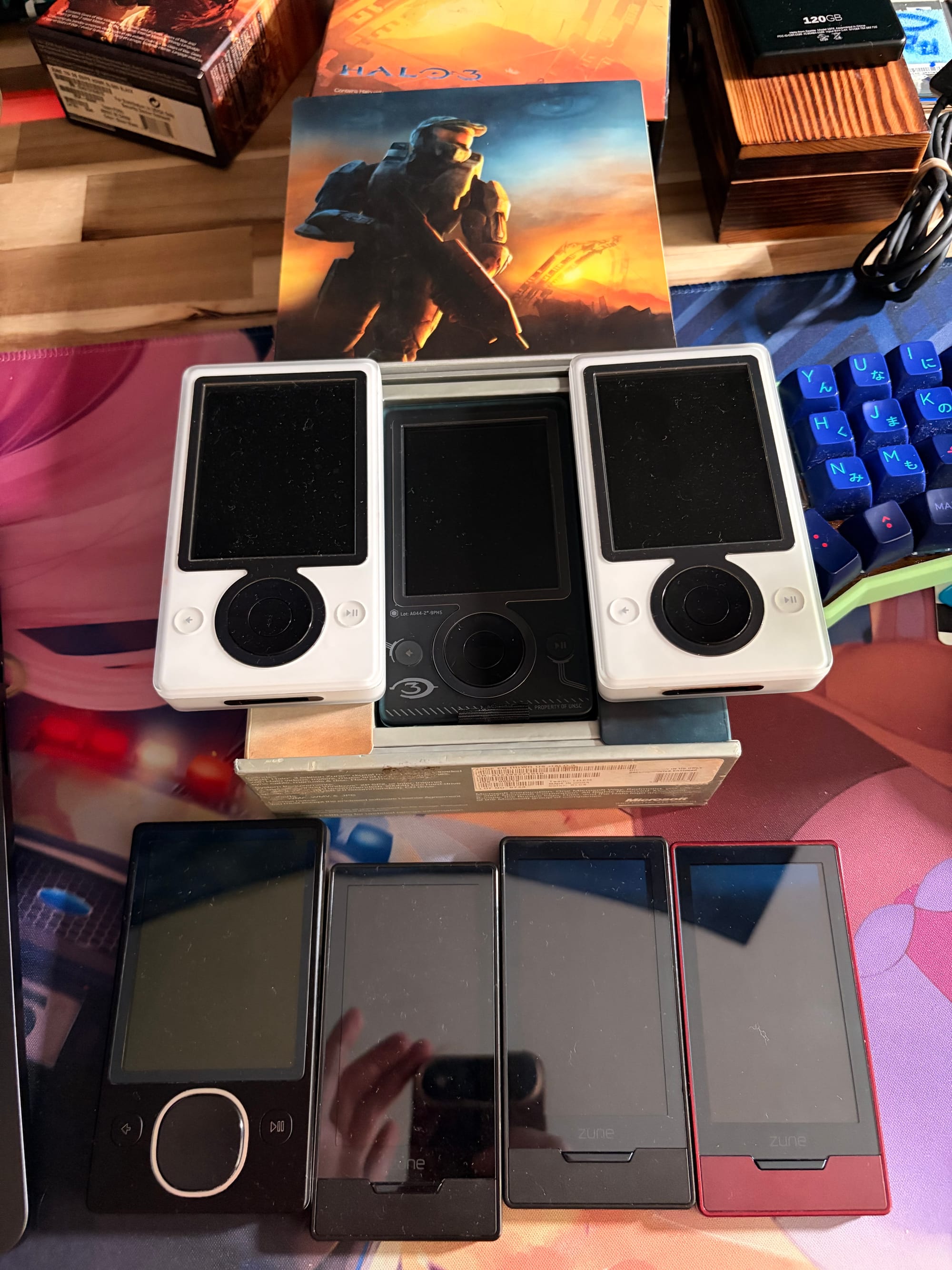
So here's the thing. I bought a Zune in 2025. Not ironically. Not as a joke. I genuinely wanted to use it. The problem? Microsoft killed the Zune desktop software in 2012, Windows 10 barely tolerates it, and macOS has never heard of it. The device is a brick without its software.
Most people would accept this and move on. I am not most people.
This is the story of how I built libzune, a complete C library that speaks the Zune's proprietary USB protocol. The MTPZ authentication layer is ported from Sajid Anwar's open-source libmtp work, and the ZMDB database parser builds on reverse-engineering by magicisinthehole and NiceBeard. Everything else — the native PTP/MTP stack, device driver, sync pipeline, transcoding — is original C code informed by Wireshark captures, hex dumps, and a lot of patience.
What follows is every single protocol detail I've discovered. Every hex code. Every quirk. Every undocumented behavior. Consider this the documentation Microsoft never published and probably hoped nobody would ever write.
Credits Before We Begin
Before I get into any of this, I need to give credit to the people who made this possible.
kbhomes and the libmtp-zune project extracted and published the MTPZ cryptographic keys (RSA modulus, private key, certificate chain, AES encryption key) years ago. Without those keys, none of this would be possible. You literally cannot authenticate with a Zune without them. The keys are embedded in libzune's mtpz_keys.h for out-of-box use, with ~/.mtpz-data as an override path if someone has their own set. Standing on the shoulders of giants here, and I want to make sure that's clear.
magicisinthehole and the XuneSyncLibrary project did the original reverse engineering of the ZMDB binary database format, the device family identification, and the PPP/TCP/IP tunnel protocol. NiceBeard and zune-explorer built a JavaScript/Electron implementation that was an incredible reference for the MTPZ handshake and ZMDB parsing across both Classic and HD firmware versions. libzune is an independent C implementation (no code was copied), but these projects were essential for understanding what bytes mean what. I would have been staring at hex dumps for years without their work.
The Problem: Microsoft Made This Hard On Purpose
The Zune doesn't use standard MTP (Media Transfer Protocol) like Android phones. It uses MTPZ, Microsoft's DRM-enhanced version that requires a cryptographic handshake before the device will accept any files. Without this handshake, you can read the device info and that's it. No music. No videos. Nothing.
Step 1: Capturing the Conversation
Before you can fake a conversation, you need to hear one. I set up a Windows VM with the official Zune software, ran Wireshark with USBPcap, and synced a few albums. This gave me thousands of USB packets to analyze.
MTP runs over PTP (Picture Transfer Protocol), which itself runs over USB bulk pipes. Understanding the layer cake is key to everything that follows.
The USB Layer: Where It All Starts
The Zune identifies itself with:
Vendor ID:   0x045E (Microsoft Corporation)
Product ID:  0x0710 (Zune Classic: 30, 80, 120, 4, 8, 16)
             0x063E (Zune HD: 16, 32, 64)
When you plug in a Zune, macOS sees a PTP/MTP class device and immediately dispatches ptpcamerad to claim it. On my system, I built a DriverKit system extension (DEXT) with a probe score of 100,000 to win the device claim before Apple's daemon can touch it. More on that later.
Once you have the device, you need to find the USB endpoints. The Zune exposes three:
Bulk OUT:     0x02  (host to device, 512-byte max packet)
Bulk IN:      0x81  (device to host, 512-byte max packet)
Interrupt IN: 0x83  (event notifications)
The interface can show up as:
bInterfaceClass = 0xFF(vendor-specific)bInterfaceClass = 6(PTP/Still Image)bInterfaceClass = 0withbNumEndpoints >= 3
You iterate the endpoint descriptors looking for type 2 (bulk) and type 3 (interrupt), separating IN (address & 0x80) from OUT pipes. Once you have bulk IN, bulk OUT, and interrupt IN, you're ready to talk PTP.
PTP: The Transport Layer
PTP (Picture Transfer Protocol) is the framing layer underneath MTP. Every message is wrapped in a container:
PTP Container Header (12 bytes):
  [0x00-0x03] uint32LE  container_length (total bytes including this header)
  [0x04-0x05] uint16LE  container_type:
                           0x0001 = Command (host to device)
                           0x0002 = Data (payload follows)
                           0x0003 = Response (result code)
                           0x0004 = Event (async notification)
  [0x06-0x07] uint16LE  operation_code
  [0x08-0x0B] uint32LE  transaction_id (increments per operation)
A typical MTP exchange looks like:
Host -> Device:  Command container (12 bytes + up to 5 uint32 parameters)
Host <> Device:  Data container (if operation has data phase)
Device -> Host:  Response container (12 bytes, response code at [0x06])
Response Codes: What the Zune Tells You (and Doesn't)
0x2001  OK                      Success
0x2002  GeneralError            Something went wrong (the Zune's favorite)
0x2003  SessionNotOpen          Forgot to call OpenSession
0x2004  InvalidTransactionID    Transaction counter mismatch
0x2005  OperationNotSupported   This opcode doesn't exist here
0x2006  ParameterNotSupported   Bad parameter value
0x2007  IncompleteTransfer      Data transfer got interrupted
0x2008  InvalidStorageID        Wrong storage handle
0x2009  InvalidObjectHandle     Object doesn't exist
0x2010  NoThumbnailPresent      No album art available
0x2013  StoreNotAvailable       Storage is busy
0xA801  ObjectPropNotSupported  Vendor extension. The Zune uses this when you
                                 try to set AlbumArtist after album creation.
                                 The property IS supported... just not anymore.
Data Type Codes
When sending or receiving property values, each has a type:
0x0000  UNDEF     Undefined
0x0001  INT8      Signed 8-bit
0x0002  UINT8     Unsigned 8-bit
0x0003  INT16     Signed 16-bit
0x0004  UINT16    Unsigned 16-bit
0x0005  INT32     Signed 32-bit
0x0006  UINT32    Unsigned 32-bit
0x0007  INT64     Signed 64-bit
0x0008  UINT64    Unsigned 64-bit
0x4002  AUINT8    Array of uint8 (album art raw data)
0x4004  AUINT16   Array of uint16 (Description property, UCS-2LE text)
0x4006  AUINT32   Array of uint32 (object references)
0xFFFF  STR       MTP string: uint8 char_count + UCS-2LE chars + null
The Description property (0xDC48) is a fun one. You'd think it's a string. It's not. On the Zune, it MUST be sent as AUINT16, which is UCS-2LE encoded text with an array header. Send it as a regular MTP string and the Zune ignores it silently. No error. Just nothing happens.
The First Quirk: Split Header/Data Mode
This one took me days to figure out. I had the MTP stack working. I could open a session, query device info, list files. But the moment I tried to send a file? 0x2002 General Error. Every. Single. Time.
I compared my packets to the Wireshark capture and they were identical. Same bytes. Same order. Same everything. Except for one thing: Microsoft's software was sending the 12-byte PTP header as a SEPARATE USB write from the payload data. My code was combining them into one write.
Turns out the Zune firmware has a parser that expects the header to arrive in its own USB transaction. If you send header + data in one bulk transfer, the firmware's parser chokes and returns 0x2002. This isn't in any spec. This isn't documented anywhere. The Zune just silently rejects your data and tells you nothing useful.
// WRONG: Zune rejects this with 0x2002
usb_bulk_write(buf, header_size + data_size);

// RIGHT: Zune requires this
usb_bulk_write(buf, 12);              // header only, always 12 bytes
usb_bulk_write(buf + 12, data_size);  // payload as separate transfer
Auto-detection is simple: during GetDeviceInfo (0x1001), if the first bulk read returns exactly 12 bytes (just the response header) instead of header + data together, the device uses split mode. Set a flag and split every data container from that point forward.
One more thing: if the total container length is an exact multiple of the USB max packet size (512 bytes), you need to send a Zero Length Packet (ZLP) after the data to signal end-of-transfer. Miss the ZLP and the device hangs waiting for more data.
Standard MTP Operations
Here are all the standard PTP/MTP operations the Zune supports:
PTP Core:
0x1001  GetDeviceInfo       Returns device capabilities, extensions, formats
0x1002  OpenSession         Start an MTP session (required before anything)
0x1003  CloseSession        End the session
0x1004  GetStorageIDs       List storage volumes
0x1005  GetStorageInfo      Storage capacity and free space
0x1006  GetNumObjects       Count objects of a given type
0x1007  GetObjectHandles    List object IDs
0x1008  GetObjectInfo       Metadata for a single object
0x1009  GetObject           Download an object's data
0x100A  GetThumb            Get thumbnail image
0x100B  DeleteObject        Remove an object
0x100C  SendObjectInfo      Create object header (legacy method)
0x100D  SendObject          Upload object data
0x1014  GetDevicePropDesc   Describe a device property
0x1015  GetDevicePropValue  Read a device property
0x1016  SetDevicePropValue  Write a device property
0x101B  GetPartialObject    Read a byte range from an object

MTP Extensions:
0x9801  GetObjectPropsSupported   What properties exist for a format code
0x9802  GetObjectPropDesc         Describe a single property
0x9803  GetObjectPropValue        Read a property from an object
0x9804  SetObjectPropValue        Write a property to an object
0x9805  GetObjectPropList         Read multiple properties at once
0x9808  SendObjectPropList        Create object with properties atomically
0x9810  GetObjectReferences       Get linked objects (album tracks, etc.)
0x9811  SetObjectReferences       Set linked objects
Object Format Codes: What Lives on a Zune
0x3000  Undefined           Generic file
0x3001  Association         Folder
0x3009  MP3                 Audio (MPEG Layer 3)
0x300D  ASF                 Video container (WMV/AVI)
0x3801  JPEG                Image
0xB901  WMA                 Audio (Windows Media Audio)
0xB981  WMV                 Video (Windows Media Video)
0xB982  MP4                 Video (H.264/AAC)
0xB984  3GP                 Video (3GPP)
0xBA03  AbstractAudioAlbum  Album container object
0xBA05  AbstractAudioVideoPlaylist  Playlist container
0xB218  AbstractArtist      Artist object (minimal props, requires auth first)
Format 0xB218 (AbstractArtist) shows up in the device's supported formats list, and you can create artist objects with it via SendObjectPropList. The supported properties are minimal (mostly just ObjectFileName and Name), but creation works. libzune's zune_forge_artist() uses this to create artist objects and link them to albums via ArtistId (0xDAB9). The Zune uses these for proper artist display grouping. Earlier in development I thought this format was non-functional because the property list seemed empty — turns out you need to query properties after MTPZ auth completes or the device returns nothing.
MTP Object Properties: The Complete Reference
Every object on the Zune has properties. Here's every property code I've confirmed:
Standard Properties:
0xDC01  StorageID              Which storage volume the object lives on
0xDC02  ObjectFormat           Format code (MP3, WMA, JPEG, etc.)
0xDC04  ObjectSize             File size in bytes
0xDC07  ObjectFileName         Filename on device filesystem
0xDC08  DateCreated            Creation timestamp
0xDC09  DateModified           Modification timestamp
0xDC0B  ParentObject           Parent folder handle
0xDC44  Name                   Display title (what the user sees)
0xDC46  Artist                 Artist name (used on BOTH tracks AND albums)
0xDC48  Description            Plot/synopsis (MUST be AUINT16, not string!)
0xDC89  Duration               Length in milliseconds (uint32)
0xDC8A  Rating                 0-100 scale (uint8)
0xDC8B  Track                  Track number (uint16)
0xDC8C  Genre                  Genre name string
0xDC91  UseCount               Play count (uint32)
0xDC95  MetaGenre              Video category controller (uint16)
0xDC9A  AlbumName              Album title string
0xDC9B  AlbumArtist            READ-ONLY after creation! Use 0xDC46 instead.

Album Art (Representative Sample):
0xDC81  RepresentativeSampleFormat   REJECTED by Zune (0x200F), do not send
0xDC82  RepresentativeSampleSize     REJECTED by Zune (0x200F), do not send
0xDC83  RepresentativeSampleHeight   REJECTED by Zune (0x200F), do not send
0xDC84  RepresentativeSampleWidth    REJECTED by Zune (0x200F), do not send
0xDC86  RepresentativeSampleData     Raw JPEG bytes (AUINT8) — the ONLY one that works

Zune Vendor Properties:
0xDA9A  SeriesName             TV show series title string
0xDAB5  Season                 Season number (uint32)
0xDAB6  Episode                Episode number (uint32)
0xDAB9  ArtistId               Internal artist reference ID
The AlbumArtist Trap (0xDC9B)
This one cost me a full day. The Zune reports AlbumArtist (0xDC9B) as a supported property on album objects. GetObjectPropsSupported confirms it. GetObjectPropDesc describes it. But if you create an album first and then try SetObjectPropValue on 0xDC9B? 0xA801 ObjectPropNotSupported.
The property IS supported, but only during atomic creation via SendObjectPropList (0x9808). After the album exists, it becomes read-only. No error during creation, instant rejection after.
The workaround: use Artist (0xDC46) for album objects. Despite what the spec implies, albums display the Artist property, not AlbumArtist.
MetaGenre (0xDC95): Video Categories
This uint16 controls where videos appear in the Zune's UI:
0x21  Other         -> "Other" section
0x23  Music Video   -> "Music Videos" section
0x25  Movie         -> "Movies" section
0x26  TV Show       -> "TV Shows" section
For TV shows, you also need the vendor properties:
0xDA9A  SeriesName  = "Breaking Bad"    (case-sensitive!)
0xDAB5  Season      = 1                 (uint32)
0xDAB6  Episode     = 3                 (uint32)
The Zune groups episodes by SeriesName and sorts by Season + Episode. If SeriesName doesn't match exactly between episodes, you get duplicate series entries.
Device Properties
Properties that live at the device level, not on individual objects:
0x5001  BatteryLevel        uint8, 0-100%
0xD402  FriendlyName        User-set device name (MTP string)
0xD406  SessionInitiatorInfo  Client ID string (checked during MTPZ auth)
0xD21A  ZuneDeviceFamily    4-byte hardware model identifier
Device Family Identification (0xD21A)
This is how you tell Zune models apart programmatically. The raw value is a uint32 read from MTP property 0xD21A. The device family is identified by the upper byte: (raw >> 24) & 0xFF.
Family Byte  Codename    Hardware                  ZMDB Version
0x00         Keel        Zune 30 (1st gen, HDD)    v2 (Classic)
0x02         Scorpius    Zune 4/8/16 (flash)       v2 (Classic)
0x03         Draco       Zune 80/120 (HDD)         v2 (Classic)
0x06         Pavo        Zune HD (flash/SATA)      v5 (HD)
The lower 24 bits of the raw value vary by firmware version and aren't used for identification. The device family determines which video transcode profile to use and which ZMDB schema to expect. Get this wrong and you'll send video the device can't play or parse database records with the wrong field offsets.
The MTPZ Handshake: RSA, AES, and a Lot of Crying
MTPZ authentication is a 6-step cryptographic handshake using RSA-1024 and AES-128. Without completing all 6 steps, the Zune will not accept any file writes. Period.
The Keys
You need five pieces of cryptographic material (stored in ~/.mtpz-data, one per line):
Line 1: Public exponent      "10001" (hex for 65537)
Line 2: AES encryption key   32 hex chars = 16 bytes
         Example: "b1ce711c1e1b468784a08490d5962216"
Line 3: RSA modulus           256 hex chars = 128 bytes
Line 4: RSA private key       256 hex chars = 128 bytes
Line 5: X.509 certificate     1258 hex chars = ~629 bytes
Step 1: Introduce Yourself
Operation: SetDevicePropValue (0x1016)
Property:  0xD406 (SessionInitiatorInfo)
Value:     "libmtp/Sajid Anwar - MTPZClassDriver"
You literally have to pretend to be a specific piece of software. The Zune firmware checks this string. If it doesn't match, authentication fails silently. No error code. No rejection. Just nothing works after this point.
Step 2: Reset Previous Auth State
Operation: EndTrustedAppSession (0x9216)
Parameters: none
Expected Response: 0x2001 (OK)
Step 3: Send Your Certificate
Operation: SendWMDRMPDAppRequest (0x9212)
Data Phase: SENDDATA
Payload: ~785 bytes
The payload structure:
Bytes 0-4:         Header [0x02, 0x01, 0x01, 0x00, 0x00]
Bytes 5-6:         Certificate chain length (uint16 big-endian)
Bytes 7 to N:      X.509 certificate chain (from line 5 of key file)
Bytes N+1 to N+2:  Random block marker [0x00, 0x10]
Bytes N+3 to N+18: 16 random bytes (SAVE THESE for verification in step 4)
Bytes N+19 to N+21: Signature header [0x01, 0x00, 0x80]
Bytes N+22 to N+149: 128-byte RSA-PSS signature
The signature computation:
- SHA-1 hash of message bytes from offset 2 to pre-signature length
- Place that 20-byte hash at offset 8 in a 28-byte buffer (first 8 bytes zeroed)
- SHA-1 hash of THAT 28-byte buffer
- MGF1-SHA1 expansion to 107 bytes
- Build a 128-byte PSS-padded block:
- XOR the MGF1 output with first 107 bytes
- Append the 20-byte hash
- Append 0xBC as final byte
- Clear the top bit of byte 0
- RSA raw private key operation (modular exponentiation, 1024-bit)
If any single byte is wrong, the Zune just doesn't respond. No error. Just silence.
Step 4: Decrypt the Device's Challenge
Operation: GetWMDRMPDAppResponse (0x9213)
Data Phase: GETDATA
Response: ~272 bytes
The device sends back its challenge encrypted with RSA-OAEP:
- Extract the 128-byte encrypted block at offset 4
- RSA private key operation (modular exponentiation)
- OAEP unmasking:
- Extract 1-byte prefix and 20-byte masked seed
- MGF1 expand the remaining 107 bytes to recover seed mask
- XOR to recover actual seed
- MGF1 expand seed to get data mask
- XOR to recover actual data
- Extract 16-byte AES session key from decrypted bytes 112-127
Then AES-CBC decrypt the rest:
Algorithm: AES-128-CBC
Key:       Derived from SHA-1 of session data
IV:        16 zero bytes
Length:    From response offset 134 (uint16 big-endian)
The decrypted payload contains a certificate echo (verify it matches step 3), random echo (verify it matches your 16 random bytes), device random data, and a MAC hash block used for steps 5 and 6.
Step 5: Prove You Decrypted It
Operation: SendWMDRMPDAppRequest (0x9212)
Payload: 20 bytes
  Bytes 0-3:   [0x02, 0x03, 0x00, 0x10]
  Bytes 4-19:  16-byte AES-CMAC tag
AES-CMAC (RFC 4493) over seed [0x00 x 15, 0x01] using macHash[0..15] as key.
Step 6: Final Enable
Operation: EnableTrustedFilesOperations (0x9214)
Parameters: 4 x uint32 derived from CMAC
Another AES-CMAC computation:
Key:   macHash[0..15]
Data:  macHash[16..19]
Result: 16-byte CMAC split into 4 big-endian uint32 parameters
  param0 = cmac[0..3]
  param1 = cmac[4..7]
  param2 = cmac[8..11]
  param3 = cmac[12..15]
After step 6, write access is unlocked. Miss any step or get any byte wrong and you start over from scratch.
Vendor Opcodes: The Complete Secret Menu
Through Wireshark captures and trial-and-error, here's every vendor opcode:
MTPZ Authentication
0x9212  SendWMDRMPDAppRequest         Auth steps 3 & 5 (cert + CMAC)
0x9213  GetWMDRMPDAppResponse         Auth step 4 (device challenge)
0x9214  EnableTrustedFilesOperations   Auth step 6 (final unlock)
0x9216  EndTrustedAppSession          Auth step 2 (reset state)
DRM / Media Session
0x9101  GetSecureTimeChallenge   DRM clock negotiation
0x9102  GetSecureTimeResponse    DRM clock response
0x9108  CleanDataStore           Refresh WMDRMPD data store
0x9170  OpenMediaSession         Media session init
0x9171  CloseMediaSession        Media session cleanup
0x9172  GetNextDataBlock         Media session data fetch
ZMDB Database
0x9217  GetZMDB        Download entire Zune Media Database binary
0x9219  CheckChanges   Delta query (5000ms timeout, all-zero = no changes)
Sync Notification
0x922A SyncNotify Pre-transfer notification (track name + counters)
PPP Tunnel (Yes, Really)
0x922B  PPP_Control   PPP tunnel control frame (260-byte buffer)
0x922C  PPP_Send      Send PPP frames host -> device
0x922D  PPP_Poll      Poll for PPP frames (~1 Hz idle)
0x922F  PPP_Fetch     Bulk fetch PPP buffer (16-byte header + 1008 payload)
0x9230  PPP_Mode      PPP mode select
Microsoft built a full TCP/IP network stack over vendor USB commands. PPP with LCP/IPCP negotiation, IP addressing (device: 192.168.55.101, host: 192.168.55.100), TCP with flow control, and HTTP over all of it. This was for Zune Social features. I haven't fully implemented it because it's not needed for sync, but the fact that it exists is absolutely wild.
Finalization
0x9201  ReportAddedDeletedItems   Triggers device DB rebuild
0x9202  ReportAcquiredItems       Marks items as synced
Both fail on macOS (return -1). That's fine. The Zune auto-re-indexes on USB disconnect.
Known But Dangerous
0x9204, 0x9215, 0x9218, 0x921A-0x921D, 0x9220-0x9229,
0x922E, 0x9231, 0x9232, 0x9240, 0x9242, 0x9243, 0x6108
These show up in device capabilities but cause USB stalls when called. Leave them alone.
The ZMDB: A Binary Database Nobody Was Supposed to Read
The Zune stores its entire media library in a binary database called ZMDB (Zune Media Database). This isn't accessible through normal MTP. You download it via vendor opcode 0x9217 as raw bulk USB data.
Downloading the ZMDB
Send 16 bytes on the bulk OUT pipe:
[0x00-0x03] 0x10 0x00 0x00 0x00   length = 16
[0x04-0x05] 0x01 0x00             command marker
[0x06-0x07] 0x92 0x17             opcode (wire byte order)
[0x08-0x0A] 0x03 0x92 0x1F        object ID = music library
[0x0B]      0x00                  padding
[0x0C-0x0F] 0x01 0x00 0x00 0x00   trailer
Wait 250ms (mandatory, device needs prep time), then read 64KB chunks on bulk IN until you have total_size bytes. Drain with a 512-byte read after (100ms timeout, will probably fail, that's fine).
ZMDB Header
Offset 0x00-0x03:  Magic "ZMed" (0x5A 0x4D 0x65 0x64)
Offset 0x04:       Version byte
                     0x02 = Classic (Zune 30/80/120/4/8/16)
                     0x05 = Zune HD
Offset 0x05-0x1F:  Reserved
Offset 0x20:       Version (uint16LE, redundant)
ZArr Descriptor Table
Starting around offset 0x30, search for "ZArr" (0x5A 0x41 0x72 0x72). 96 descriptors, 20 bytes each:
ZArr Descriptor (20 bytes):
  [+0]   4 bytes   magic ("ZArr" or zeros if unused)
  [+6]   uint16LE  entry_size (bytes per fixed record)
  [+8]   uint32LE  entry_count
  [+16]  uint32LE  data_offset (byte offset to data start)
Master Index (Descriptor 0)
8-byte index entries:
[+0] uint32LE  atom_id (upper byte = schema type)
[+4] uint32LE  record_offset
Schema types:
0x01  Music Track        0x09  Genre
0x02  Video              0x0A  VideoTitle Reference
0x03  Photo              0x0B  Photo Album
0x05  Filename String    0x0C  Collection
0x06  Album              0x0F  Podcast Show
0x07  Playlist           0x10  Podcast Episode
0x08  Artist             0x11  Audiobook Title
                         0x12  Audiobook Track
Record Header
Every record has a 4-byte prefix at offset - 4:
uint32LE: (size & 0x00FFFFFF) | (flags << 24)
  Lower 24 bits = record size
  Upper 8 bits = flags (bit 31 set = deleted, skip it)
Music Record (Schema 0x01)
Zune HD (32 bytes fixed + variable title):
Offset  Size  Type       Field
[0:4]   4     uint32LE   albumRef
[4:8]   4     uint32LE   artistRef
[8:12]  4     uint32LE   genreRef
[12:16] 4     uint32LE   filenameRef
[16:20] 4     int32LE    duration (ms)
[20:24] 4     int32LE    filesize (bytes)
[24:26] 2     uint16LE   trackNumber
[26:28] 2     uint16LE   playCount
[28:30] 2     uint16LE   codecId
[30:31] 1     uint8      rating (8=liked, 3=disliked, 0=neutral)
[31]    1     padding
[32:]   var   UTF-8      null-terminated title
Classic (28 bytes fixed): Same minus codecId/rating. Title at offset 28.
Album Record (Schema 0x06)
Zune HD (20 bytes fixed):
[0:4]   uint32LE   artistRef
[4:12]  8 bytes    reserved
[12:20] uint64LE   FILETIME (release year)
[20:]   UTF-8      null-terminated album title
FILETIME to year: ticks / 10000000 - 11644473600 -> gmtime().tm_year + 1900
Classic (12 bytes fixed): No FILETIME. Title at offset 12.
Artist Record (Schema 0x08)
Zune HD: 4 bytes reserved, then UTF-8 name.
Classic: 1 byte flags, then UTF-8 name.
Video Record (Schema 0x02, 40 bytes fixed — Classic only)
Important: This layout is only confirmed for Classic firmware (Zune 30/80/120, flash 4/8/16). Zune HD video records have a different, larger layout that doesn't match these offsets. libzune skips ZMDB video parsing on HD devices entirely and falls back to live MTP reads.
[0:4]   uint32LE   folderRef (always 0x05FFFFFF)
[4:8]   uint32LE   titleRef (ALWAYS EMPTY, DO NOT USE)
[8:12]  uint32LE   unknown (always 0)
[12:16] uint32LE   filenameRef (always 0x00000000)
[16:20] uint32LE   filesize
[20:32] 12 bytes   zeros
[32:34] uint16LE   formatCode (0xB981=WMV, 0xB982=MP4)
[34:38] 4 bytes    padding
[38:40] uint16LE   zuneType (VIDEO CATEGORY)
[40:]   UTF-8      null-terminated ACTUAL title
That titleRef at offset +4 was a trap I fell into for a week. It references a VideoTitle atom (schema 0x0A), but resolves to an empty string every time. The actual title? Inline at offset +40. I found it by hex-dumping the entire ZMDB and searching for known filenames.
zuneType mapping:
0x0001 -> Music Video  (MetaGenre 0x23)
0x0002 -> Movie        (MetaGenre 0x25)
0x0004 -> TV Show      (MetaGenre 0x26)
other  -> Other        (MetaGenre 0x21)
Photo Record (Schema 0x03, 24 bytes fixed)
[0:4]   uint32LE   folderRef
[4:8]   uint32LE   albumRef
[8:12]  uint32LE   collectionRef
[12:16] uint32LE   filenameRef
[16:24] uint64LE   FILETIME timestamp (NOT dimensions!)
[24:]   UTF-8      null-terminated title
Photo dimensions are NOT in the ZMDB. The Zune reads them from JPEG headers during re-index. If you set Width/Height via MTP properties post-send, it corrupts ALL photos on the device. I learned this the hard way.
The Backwards Varint
After the title string in some records, extra fields are encoded walking backwards from the record end. Each field has a type marker byte:
Type   Field           Data Format
0x44   Filename        UTF-16LE string (variable)
0x63   Skip count      uint32LE
0x6C   Disc number     uint32LE
0x70   Last played     uint64LE (Windows FILETIME)
0x14   GUID            16 raw bytes
Start at the last byte, read the type marker, read the data bytes before it, move the pointer back, repeat. Why backwards? Nobody knows. Microsoft vibes.
Creating Objects: SendObjectPropList (0x9808)
The Zune requires objects created atomically with all properties. Wire format:
uint32LE  storage_id
uint32LE  parent_handle (0 for root)
uint16LE  format_code
uint32LE  object_size (0 for abstract objects)
uint32LE  property_count
[entries]:
  uint32LE  object_handle (always 0 for new)
  uint16LE  property_code
  uint16LE  data_type
  [typed value]
Album Art Upload
One property write — RepresentativeSampleData only:
SetObjectPropValue(album_id, 0xDC86, AUINT8, jpeg) Raw JPEG data
The MTP spec defines separate properties for format (0xDC81), width (0xDC84), height (0xDC83), and size (0xDC82). The Zune rejects all of them with response 0x200F. Only 0xDC86 works. The AUINT8 wire format is a uint32 LE count prefix followed by the raw JPEG bytes.
JPEG only. Baseline, sRGB, no EXIF. The Zune HD is very picky. Progressive JPEG or CMYK colorspace causes corruption.
Video Transcode Profiles
Profile 0: Zune 30 (Keel)
  WMV2 320x240, 800kbps video, WMAv2 128kbps audio, ASF container

Profile 1: Zune 4/8/16/80/120 (Scorpius/Draco)
  H.264 Baseline L2.1, 320x240, 768kbps, AAC 128kbps, MP4

Profile 2: Zune HD (Pavo)
  H.264 Baseline L3.1, 480x272, 2500kbps, AAC 192kbps, MP4

Profile 3: Zune HD 720p
  H.264 Baseline L3.1, 1280x720, 8000kbps, AAC 192kbps, MP4
Audio: everything becomes MP3 320kbps CBR via LAME. All MP3s retagged to ID3v2.3 (Zune ignores v2.4, shows "Unknown Artist").
The Complete Track Sync Pipeline
From file to playing on the Zune in 7 steps:
1. RETAG        MP3 -> ID3v2.3 rewrite (pure C binary rewriter)
                Other -> transcode to MP3 320k via libav* + LAME

2. SMUGGLE      SendObjectPropList (0x9808) + SendObject (0x100D)
                Returns: item_id

3. COLLECT      Group tracks by "{artist}\t{album}"

4. FORGE        Create album via SendObjectPropList (format 0xBA03)
                SendObject with 1 byte (abstract object)

5. LINK         SetObjectReferences (0x9811): album <- [track_ids]

6. BRAND        Album art via RepresentativeSampleData (0xDC86)

7. FINALIZE     ReportAddedDeletedItems (0x9201), CleanDataStore (0x9108)
                ReportAcquiredItems (0x9202)
                USB disconnect -> device re-indexes ZMDB
The Device Driver: Because ApplePTPCamera Won't Stop
On macOS, ptpcamerad grabs every PTP/MTP device automatically. My DEXT claims the Zune first:
IOKitPersonalities:
  idVendor:    0x045E
  idProduct:   0x0710 / 0x063E
  IOProbeScore: 100000
The DEXT discovers endpoints from the interface descriptor, creates bulk IN/OUT/interrupt pipes, and exposes them via IOUserClient. The app talks to the driver through IOConnectCallMethod calls. libzune's driverkit_usb.c implements this as a pluggable USB backend alongside usb_libusb.c for Linux.
The Naming Convention
Every function uses rebellion-themed verbs. Because why not.
zune_breach()           Connect + MTPZ authenticate
zune_sever()            Disconnect
zune_smuggle_track()    Send music
zune_smuggle_movie()    Send movie (MetaGenre 0x25)
zune_smuggle_episode()  Send TV episode (MetaGenre 0x26)
zune_smuggle_clip()     Send music video (MetaGenre 0x23)
zune_smuggle_other()    Send uncategorized video (MetaGenre 0x21)
zune_smuggle_photo()    Send photo
zune_forge_album()      Create album object
zune_forge_artist()     Create artist object
zune_forge_playlist()   Create playlist
zune_brand()            Set album art
zune_rewire_album()     Update album track list
zune_link_artist()      Associate artist with album
zune_purge_track()      Delete from device
zune_extract_track()    Download music from device
zune_extract_video()    Download video from device
zune_infiltrate()       Scan ZMDB database
zune_arm_audio()        Transcode audio
zune_unjam()            Clear USB stall
zune_abort()            Cancel transfer
zune_finalize()         Post-sync finalization
zune_probe()            Extract metadata from file
zune_identify()         Read device info
zune_get_battery()      Battery %
zune_get_capacity()     Storage info
zune_get_headroom()     Free space
Every Known Protocol Quirk
The full list of undocumented behaviors, in order of how much pain they caused me:
Split Header/Data Mode. All MTP ops return 0x2002 if you combine header + data in one USB write. Days of debugging for a two-line fix.
AlbumArtist Read-Only Post-Creation. Property 0xDC9B is supported during atomic creation only. Returns 0xA801 after. Use 0xDC46 instead.
AbstractArtist Requires Auth First. Format 0xB218 works for creating artist objects, but only returns supported properties after MTPZ authentication completes. Query before auth and you get an empty list.
ZMDB Video Title Inline. Video titleRef (offset +4) always resolves empty. Actual title is UTF-8 at offset +40. Discovered by hex dump after a week of confusion.
ZMDB Video Layout Differs on HD. The Classic video record layout (40 bytes fixed) doesn't apply to Zune HD. HD video records are larger with different field offsets. Parsing them with the Classic layout misidentifies every video as "Other." libzune skips ZMDB video parsing on HD entirely and falls back to MTP enumeration.
Photo Property Corruption. Setting Width/Height via MTP on photos corrupts ALL photos on the device. Never write photo properties post-send.
ID3v2.4 Ignored. Zune firmware only reads ID3v2.3 tags. Songs show "Unknown Artist" until retagged.
Description Must Be AUINT16. Property 0xDC48 looks like a string but must be sent as an array of uint16 (UCS-2LE). Regular MTP string format is silently ignored.
PPP Over USB. Full TCP/IP stack over vendor opcodes 0x922B-0x9230. Not required for sync.
Vendor Ops Fail on macOS. 0x9201 and 0x9202 return -1. Not needed, device auto-re-indexes on disconnect.
DEXT Death Under Load. DriverKit process silently dies after 9-34 sustained transfers. Workaround: 200ms pause between transfers.
250ms ZMDB Read Delay. Must wait after sending GetZMDB request. Too early and you get garbage.
Zero Length Packet. Container size multiple of 512 needs a ZLP. Device hangs otherwise.
Case-Sensitive SeriesName. "breaking bad" and "Breaking Bad" create two separate series on the device.
What I Learned
Reverse engineering a proprietary USB protocol is equal parts detective work and masochism. The device never tells you what you did wrong. Error codes are generic. Timing matters in ways the spec doesn't mention. And every "undocumented behavior" is a puzzle that can only be solved by staring at hex dumps until the pattern clicks.
But there's something deeply satisfying about making a dead device work again. The Zune was a good product that died for business reasons, not technical ones. Giving it new life on a platform it was never designed for feels like justice.
The backend library (libzune) is fully open source. Every hex code in this post maps to real, working code that you can read, build, and use in your own projects. libzune is designed to be a standalone C library that any frontend can link against. If someone wants to build a Linux GUI, a Windows app, or a terminal tool, the entire protocol stack is ready to go.
The macOS frontend (Zuuned) is still a work in progress. It's functional and I use it daily, but it's not open source yet. Once the UI is polished and the remaining rough edges are sorted out, I'll open it up too. For now, the important part is that the protocol knowledge is out there. No more black box. No more vendor lock-in on a dead product.
A quick disclaimer: I don't know everything about this protocol. Some of these findings might need correction as more testing happens across different Zune models and firmware versions. If you spot something wrong or know something I don't, reach out. This is meant to be a living document for the community, not the final word from on high.
If you've got a Zune collecting dust in a drawer somewhere, maybe it's time to plug it back in.
Next post: Building the Zuuned macOS app, vinyl disc players, and why I put Liquid Glass on everything.
BadgerBytes is where I write about building things that probably shouldn't exist. Follow along at badgerbytes.xyz